FTP data transfer
This block is used for secure transfer of data to a server using FTP protocol.
The data is transferred regularly after changes and saved locally. This ensures regular transfer of changing files (CSV, HTML reports).
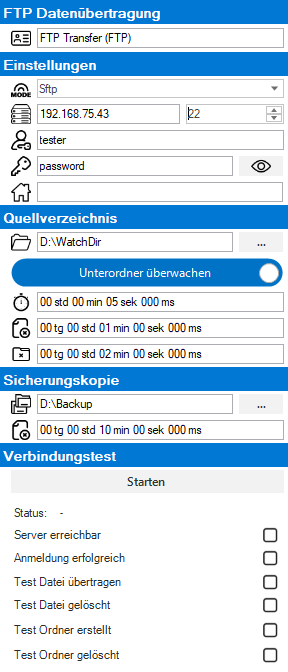
 FTP data transfer

|
Name of the block for display in the overview. |
Settings

|
FTP Transfer Mode: FTP, FtpSslImplicit, FtpSslExplicit, SFTP |

|
FTP server address and port |

|
Username for logging in to the server |

|
Password for logging in to the server |

|
Subdirectory on the server. The new data will be synchronized to this directory |
Source directory

|
Local source directory for the transfer |
| Do not monitor subfolders: Only the source directory is transferred Monitor subfolders: The source directory and all subfolders are transferred |
|

|
All files with the last write access, older than this time span, are transferred. Default: 5s |

|
All data with the last write access older than this time period will be deleted from the source directory. Default 1min |

|
Empty subfolders with the last write access older than this time period are deleted from the source directory. Default: 2min |
Backup

|
Backup folder for successfully transferred files. |
|
|
All data with the last write access, older than this period of time, will be deleted from the backup folder. |
Connection test
The connection test is used to test the entered credentials and user rights.
| State | Current status of the connection test. |
| Server responding | Is the server reachable. |
| Login successful | Does the login work with user and password. |
| Transfer test file | Transfers an EasySightPro_Test.txt file. |
| Test file deleted | Deletes the transferred EasySightPro_Test.txt file |
| Test folder created | Creates a folder EasySightPro. |
| Test folder deleted | Deletes the transferred folder. |